Translation Available תרגום זמין Traduction Disponible

לקרוא את הבלוג הזה בעברית, לתרגם הוא בצד הימין Pour traduire ce blog en Français, utiliser le bouton de traduction sur la droite de la page.

Monday, April 13, 2015

I Have the Power! Do you?

Have you ever had your computer, tablet or cell phone lose power in the middle of the day?

In the campy 80's cartoon He-Man, when the young prince Adam needed power, he would raise his sword and call out out - "By the Power Grayskull, I have the power" - and zzzzzap!  He had all sorts of power!!

If only life were that easy.

One of the biggest hardware based complaints that I get from my students and teachers is that their device - phone, tablet, computer - has lost power and needs to be charged.  This of course means tethering the device to a wall socket and inevitably, there are not enough wall sockets available when you need it the most.  Ever been in the airport with a dying device?  How about the school hallway at lunch? It is like a spider web!

Well, I am happy to say that I don't have that problem.  Why you may ask?  Well, I carry a battery backup with me!

For under $70.00, I have a couple of days worth of power in my backpack - and the cool thing is that it is about the size of thick iPhone 6.

Now, there are different external battery chargers based on what you are going to charge.  If it is an Asus PHI PC (like I run for my main tablet/laptop) then you need 9V @ 2A.  If it is your average i-device then it is 5V @ 2A.  For these devices, there is an easy fix.  My favorite (and highest rated by users) is the Anker. It will charge just about anything short of a big laptop.  

If you are fortunate enough to own a battery guzzling Mac (that uses, of course, a proprietary charging system) there are external Batteries such as Battery Box for about $159.00

PC more your style? For these laptops there is a much wider selection.  A tried and true unit is the Turcom Ultra that fits just about any PC laptop and its price comes in at about $115.00

Bottom line:  Make sure that your 1:1 program has some way of powering the units at all times.  If you don't, you may find yourself in the dark!

Yossie

Yossie Frankel
Director - Consortium for Information and Academic Technologies
Member Schools:
Harkham Hillel Hebrew Academy - yfrankel@hillelhebrew.org
Oakland Hebrew Day School - y.frankel@ohds.org
Shalhevet High School - y.frankel@shalhevet.org
Yeshivat Yavneh - www.yha.org
Arete Preparatory Academy - yfrankel@areteprep.org
Midreshet Emunah V'Omanut - Jerusalem - yfrankel@emunahvomanut.org
Checkout my blog @ technorebbe.blogspot.com
Twitter @yossiefrankel
YouTube Channel: YossieFrankelChannel
LinkedIn: www.linkedin.com/in/yossiefrankel

Thursday, April 9, 2015

YouTube and Why your filter doesn't work any more....

As you can tell from this post's title, it is going to be a "wee bit" technical.  Sorry about this, but the SSL issue and YouTube is a very important topic.

So, what's the deal?

Well, as members of the consortium - and my blog readers, there is a problem and I need to make you aware of it.  It is one of the reasons to join the consortium after all.... to be made aware of concerns that crop up in the wonderful world of school tech. (yes, another shameless plug for membership - it does have its privileges!)

Google, the owners of YouTube, has taken great measures to secure their web traffic from hackers and Internet Pirates. Those special measures are wreaking havoc with school Internet filters.

The way Google (and banks and credit card companies) protect and encrypt their Internet traffic, is by using SSL - or Secured Socket Layer.  You know, that "https://" that you see before the website name.  It means "httpSECURE."

The way this works is that Google (or the bank, etc.)  issues a security certificate that is placed on the main root servers of the Internet.  So now, whenever a computer wants to send a secured message to Google (SSL), it will be encoded using a special security protocol based on that Certificate.  This allows the sending device to safely encode its data so that no one on the Internet can see it.  The banks do this all the time!!  Technical enough for you?  So what't the big deal??

Well, since the traffic is encoded, the school filter can't take a peek to see what is in it - so it can't be blocked!  Sure, the filter will block access to a main website, but once the website is allowed, it can pass secret, encoded traffic WITHOUT the filter being able to see it.  

For example, let's say that your schools allows the YouTube video on the West Coast Tree Hugging Octopus.  The filter will see the URL and then let it through - after all, it is an allowed URL.  Now, when the student finishes watching YouTube, at the end of the video, a bunch of other videos pop up.  The student can now click on any of those videos and, as the request is fully encoded and can't be seen by the filter, the student can now watch a video that we don't want to let them see! Yes, there are ways to stop the videos from appearing at the end, but that means that you need unencumbered access to the Google website - which means leaving Google search open - and some of the schools don't want to do this.<Have you ever seen the supposedly "safe" images on "safe search???"> Even so, Google now passes this traffic through SSL as well!

Panic... Stop YouTube access!!  RED ALERT!!! Captain Kirk, the parents are going to go warp factor 7!!

Now, hang on a sec - push back the panic...  Google published a work around (that the Consortium School already have available to them) called the "man in middle" procedure.

What we can do is create our own SSL Certificate, load it to the all of the computers and iPads (and iPhones, etc.) that are in the school and so now, when the device requests an encoded session, the "man in the middle" intercepts it and tells the computer to use our SSL Certificate. Since the computer has been told to trust our SSL Certificate (we loaded it, remember?), we can now peek into the Internet transmission (like we used to do before Google went SSL) and everything is good.  Our filter can filter and everyone is happy.

HAPPY?  Uhhhh... no, not really.  Let me put on my "hacker hat" (Black Hat, in hacker terms, means "bad" hacker.  White Hats are "good" hackers...) and explain.  If I were a "black hatter," then I could use this system to hack into major banks, governments, and so on.... doesn't sound too good to me.  And guess what, it doesn't sound so good to banks, governments (and so on) either!!!

So, just when you thought that we had solved the Google/YouTube problem - it rears its ugly head again...  There is a movement to have the way we use SSL Certificates  changed dramatically so that web traffic can be more secure.  This means that our "man in the middle" technique will not work anymore!

So, what is the solution?

Well, there really isn't one right now.  While we currently have a way to filter, it will be disappearing in a year or two.  Now, before it is too late, we need to think about HOW we are going to solve filtering issues like YouTube and, better yet, WHY are we filtering?  Perhaps now is the time for us to start training our students about the necessity to become savvy consumers of information and how to deal with inappropriate videos and images that will (not CAN... believe me... it WILL) come their way.

Caveat Emptor! (buyer beware) and be Semper Paratus (always prepared)

And, now you know why I have grey hair...

Yossie


Yossie Frankel
Director - Consortium for Information and Academic Technologies
Member Schools:
Harkham Hillel Hebrew Academy - yfrankel@hillelhebrew.org
Oakland Hebrew Day School - y.frankel@ohds.org
Shalhevet High School - y.frankel@shalhevet.org
Yeshivat Yavneh - www.yha.org
Arete Preparatory Academy - yfrankel@areteprep.org
Midreshet Emunah V'Omanut - Jerusalem - yfrankel@emunahvomanut.org
Checkout my blog @ technorebbe.blogspot.com
Twitter @yossiefrankel
YouTube Channel: YossieFrankelChannel
LinkedIn: www.linkedin.com/in/yossiefrankel

Wednesday, April 8, 2015

Build your own ROBOT ARMY!!

We educators are always talking about Meta-cognitive Skills, Educational Outcomes and so on....  Well, sometimes we just have to "kick back"  and have some fun!!

Enter ROBOT ARMY.....  

An array of small robots - your own personal minions - that respond to your movements and face expressions.  There is no purpose to this army, other than it is fun!  Ummmm... well... it is also kind of an art exhibit... and we do learn about programming skills.... and we actually engineer some robots... and we do have to collaborate..... So it sounds like we are building some "STEAM" (Science/Technology/Engineering/Art/Manufacturing) skills... OK, so I lied - it does have an educational purpose - BUT IT STILL IS FUN!!

Check out this video showing the army at work....

Now check out this video explaining how you can get your own minions!!
For more information, you can go directly to the Robot Army website:

How about it.... anyone else want to go into building an army with me?


Yossie

Yossie Frankel
Director - Consortium for Information and Academic Technologies
Member Schools:
Harkham Hillel Hebrew Academy - yfrankel@hillelhebrew.org
Oakland Hebrew Day School - y.frankel@ohds.org
Shalhevet High School - y.frankel@shalhevet.org
Yeshivat Yavneh - www.yha.org
Arete Preparatory Academy - yfrankel@areteprep.org
Midreshet Emunah V'Omanut - Jerusalem - yfrankel@emunahvomanut.org
Checkout my blog @ technorebbe.blogspot.com
Twitter @yossiefrankel
YouTube Channel: YossieFrankelChannel
LinkedIn: www.linkedin.com/in/yossiefrankel

Monday, March 30, 2015

Google Cardboard - Wait a minute... CARDBOARD?

Now, I know what you are thinking.... Google is now making CARDBOARD??  Is there anything that they won't turn into a business model??

Don't go buying shares in corrugated paper just yet, what we are talking about here is Google's latest foray into Virtual Reality. In a series of previous blogs (to see, click: here, here and here) I talk about Virtual Reality vs Augmented Reality and the use of the Oculus Rift and Daqri AR.  Well, Google has create a wonderful little version of this that uses cardboard (yes, you heard me right, cardboard) and any smart phone.  Hence "Google Cardboard."

The cool thing is that you can build it yourself or get the full kit for about $15.00.  Uh-huh, Fifteen bucks and a smart phone get you into the wonderful world of VR.

Here is the kit I purchased from www.unofficialcardboard.com laid out just before assembly


And here it is one minute later... all assembled - by my 9 year old son!!

There are a whole bunch of cool apps already made and I was pleasantly surprised by the amount of video already up on you-tube supporting the split screen technology.  There are all sorts of ways to get involved with low cost VR, but this not what excites me. You see, there is a whole "development pack" that lets people create content!!

Imagine for a moment.... let's do what Google does best - a "mashup"

My daughter Rivi is a licensed tour guide in Israel (shameless plug.... www.yeshisrael.com) She would love it if she could take her clients to the Kotel - the Western Wall - and have them stand back, use some sort of an an app and have the wall magically rebuild itself - in Augmented Reality - to show her clients exactly what it looked like at the time of Hadrian and the Second Temple Period.

Imagine.... This would be a real Project Based Learning project.  Real life application, coding, working with clients, distance collaboration, the whole "9 yards!!"

There are already platforms that are available to let her do this work.... Daqri for the Augmented Reality, The Google Cardboard for the presentation platform and High School students who are "itching" for a chance to try their "Mashup" skills.

OK, so how about it.... Daqri, drop me a line with a contact name of one of your engineers that we can work with!  Google - prove that you actually read emails and blogs about your wonderful leading edge programs.  Finally - Hey AMIT schools, are you interested??  What about the folks from CIJE??  Want to try a PBL of biblical proportions?

Drop me a line through he blog - lets get this going!!

Regards to All - and have a healthly and happy Passover.

Yossie

Yossie Frankel
Director - Consortium for Information and Academic Technologies
Member Schools:
Harkham Hillel Hebrew Academy - yfrankel@hillelhebrew.org
Oakland Hebrew Day School - y.frankel@ohds.org
Shalhevet High School - y.frankel@shalhevet.org
Yeshivat Yavneh - www.yha.org
Arete Preparatory Academy - yfrankel@areteprep.org
Midreshet Emunah V'Omanut - Jerusalem - yfrankel@emunahvomanut.org
Checkout my blog @ technorebbe.blogspot.com
Twitter @yossiefrankel
YouTube Channel: YossieFrankelChannel
LinkedIn: www.linkedin.com/in/yossiefrankel

Wednesday, March 18, 2015

Live DJLN/ELI Talk Webcast Today - Hillel Style....

What was your last webcast experience like?  I know mine.... Slides on the screen, voice over the slides, no video of presenter - pretty lifeless.

Well, today at 1PM PDT, Rabbi Sufrin from the Harkham Hillel Hebrew Academy will be conducting a Google Hangout webcast for the DJLN/Eli Talks group. (The talk is on Blended Learning see description here)  .....  and the cool part is that we have set up a small TV studio in Rabbi's Office (that could be set up in any school for next-to-no-cost!!) to try to banish the "blah" type of webcast!!

The TV studio consists of an older PC, a Webcam and a great little program called "ManyCam."  (http://www.manycam.com)   

ManyCam is heart of the system and works on both PC's and Macs.  It lets you create a TV studio inside your school for almost no cost.  It is amazing!  This program allows us to present slides, picture in picture, full video, green screen effects and (hopefully) make an engaging webcast!

So, check out the live stream (link below to register) and then checkout the software!

UPDATE... since the live stream is over... here is a link to the video:

https://youtu.be/sd4DDxVNvn8


As always, your comments are solicited on the blog page.

See you all on-line!

Yossie

Yossie Frankel
Director - Consortium for Information and Academic Technologies
Member Schools:
Harkham Hillel Hebrew Academy - yfrankel@hillelhebrew.org
Oakland Hebrew Day School - y.frankel@ohds.org
Shalhevet High School - y.frankel@shalhevet.org
Yeshivat Yavneh - www.yha.org
Arete Preparatory Academy - yfrankel@areteprep.org
Midreshet Emunah V'Omanut - Jerusalem - yfrankel@emunahvomanut.org
Checkout my blog @ technorebbe.blogspot.com
Twitter @yossiefrankel
YouTube Channel: YossieFrankelChannel
LinkedIn: www.linkedin.com/in/yossiefrankel

Tuesday, March 17, 2015

Huddle Spaces - It's not for football any more!

For his last birthday party, my son Tuvia had a group of friends over to play Minecraft.  He had spent a whole week building this amazing virtual world for he and his friends to play in but, before they began, Tuvia wanted to show them the "lay of the land."   The problem was that his iPad screen was too small for everyone to huddle around and see.  As his friends complained, Tuvia said "No Problem, Tattie (Yiddish for dad), can you please turn on the huddle room?"  As I chuckled, I mirrored Tuvia's iPad to our big screen TV and his friends were happy.


More and more, as collaboration becomes entrenched in the work that we do and the way that we teach, we have to be able easily share information.  It is during that sharing that new ideas can foster, and a deep, rich group participation can begin to flow.  Schools have realized that we have to let students experience this creative sharing "huddle" and as educators, we need to know how to facilitate the process.

Don't get me wrong, "huddle spaces" have existed for decades.  The kitchen table, the corner of the classroom, the office meeting room to name a few.  The difference now is how these spaces are being equipped in a specialized way to promote local and international collaboration. In my previous blog, I dealt with a ways to share technology in these spaces and below I show some examples of the spaces themselves.

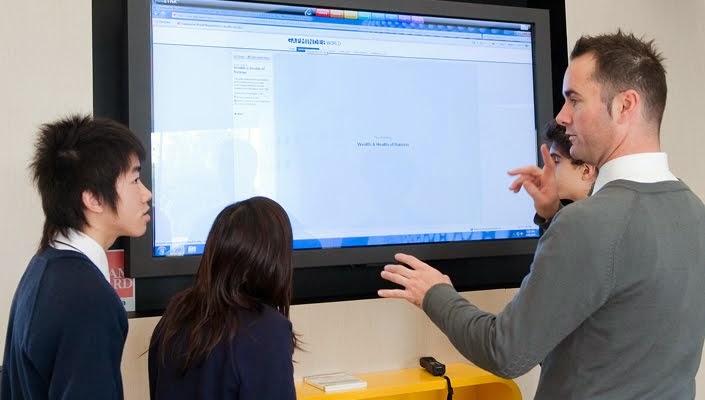
In some spaces, students get together to share ideas - and screens.

In other spaces, small, directed (differentiated) classes can take place.


Some schools create multiple huddle spaces out of a larger space.


Not all huddle spaces need to have technology.  Some are just for germinating ideas by writing on the walls.


Do you have huddle spaces in your school?  What do you think about this idea?  Share on the blog page.

Regards....

Yossie


Yossie Frankel
Director - Consortium for Information and Academic Technologies
Member Schools:
Harkham Hillel Hebrew Academy - yfrankel@hillelhebrew.org
Oakland Hebrew Day School - y.frankel@ohds.org
Shalhevet High School - y.frankel@shalhevet.org
Yeshivat Yavneh - www.yha.org
Arete Preparatory Academy - yfrankel@areteprep.org
Midreshet Emunah V'Omanut - Jerusalem - yfrankel@emunahvomanut.org
Checkout my blog @ technorebbe.blogspot.com
Twitter @yossiefrankel
YouTube Channel: YossieFrankelChannel
LinkedIn: www.linkedin.com/in/yossiefrankel

Monday, March 9, 2015

Screen Collaboration - Can't we all just get along?

As I was reading posts from the InTELA - Independent School Technology Educators of Los Angeles (www.intela.org) ... shout out to Lori Getz, Donna Mandosa, Kristin McDonald, Angela Neff, Tyler Nguyen, Richard Edmond and Tom Wadbrook....  I saw that some of my colleagues were being "attacked" by the dreaded "AppleTV signal drop!"

Now, I LOVE, LOVE, LOVE airplay and the AppleTV but truth be told, it is sometimes a bit of trying relationship.  If an iPad loses its Wifi signal for a brief moment then the AppleTV will drop it like a "hot potato!"  Now, for the most part, we have fixed these problems at our Consortium Schools (hey... a reason to join!!).  The only "downside" is that other non-Apple devices can't easily attach and share the AppleTV.  Yes, there is AirParrot (my all-time fav - shout out to http://www.airsquirrels.com) but isn't there an easier way to have all my devices screen share??

Yes... there is!!  One product that I have found that seems to answer most of my concerns is PRIJECTOR  (https://prijector.com/)


The Prijector device works with all of the major platforms (the support folks at Prijector indicate that the Chrome OS plug-in will be out soon - I hope so as I have a few installations with Chromebooks).
But really gets me about this device is that it actually is a little computer!!  Not only can you screen share, but it has built in Wifi, Bluetooth, browser AND it is a stand alone conferencing unit - just add an external camera and "shoot!!"  It has two modes of use.  1) It is part of your network - like an AppleTV and you access it with a security code (that is changeable) or 2) It is it's own Access Point and you just log on to the Prijector and then the Prijector will put you on the Internet (password protected as well).

Unlike the AppleTV, Prijector has a built in web browser, so you can surf, link, play from the device itself.  This helps save the ever important, and never enough of, Wifi Bandwidth by not having to first stream to the iPad and then re-stream to the screen share device.

The only better way I have found to do advance screen sharing is to take a computer and run emulation software on it (Like Reflector from Squirrels). Unfortunately, this means that I have to purchase a whole computer for the setup - and that can be very expensive.

Where Prijector really, really shines is in the "Huddle Room" environment - but more on "Huddle Rooms" in a later post!!

So, go to the Prijector website and hunt around.  Does this device fit your needs?  If you are a member of the Consortium, you can book my demo unit and take it for a spin (hey... another reason to join!!)  Remember that I would love to read your comments and experiences with this and other similar devices.  Please share on the blog!

Regards....

Yossie


Yossie Frankel
Director - Consortium for Information and Academic Technologies
Member Schools:
Harkham Hillel Hebrew Academy - yfrankel@hillelhebrew.org
Oakland Hebrew Day School - y.frankel@ohds.org
Shalhevet High School - y.frankel@shalhevet.org
Yeshivat Yavneh - www.yha.org
Arete Preparatory Academy - yfrankel@areteprep.org
Midreshet Emunah V'Omanut - Jerusalem - yfrankel@emunahvomanut.org
Checkout my blog @ technorebbe.blogspot.com
Twitter @yossiefrankel
YouTube Channel: YossieFrankelChannel
LinkedIn: www.linkedin.com/in/yossiefrankel