Translation Available תרגום זמין Traduction Disponible

לקרוא את הבלוג הזה בעברית, לתרגם הוא בצד הימין Pour traduire ce blog en Français, utiliser le bouton de traduction sur la droite de la page.

Tuesday, July 7, 2015

The continuing adventures of Kano Boy!

As you may be following, my 10 year old son Tuvia is taking a week-long summer camp called "Programming with Kano" from the Star Education group here in Los Angeles (http://www.starinc.org).  I asked Tuvia if he would share his experiences with my blog readers and he was all for it!

So here is how it works... I ask Tuvia questions (some from you...) and he answers them.  Ready?  Here we go!!

Tell me what your impression was as you came to the camp?
Tuvia: It was a tall building, 4 floors and Ima (mother in Hebrew) and I went up to the second floor.  We went to a balcony where waited for camp to begin.

Were you excited?
T: YES!

How many kids were there?
T: about 30.  Some were younger and a few older.  We broke into three groups grades 2 and under, grade 3 and 4 and grades 5 and up.  I was in the last group.  Most of them are older than me though.

Did they all know programming already?
T: No, there were only a couple of us that had programmed before. I was pretty advanced and there was one other kid more advanced than me.

What was your schedule for the first day?
T: We broke into our three groups and my group went into the Scratch Programming class.  We used PC's and and those of us who knew how, started right away!

What did you do?
T: We made a game that has a dragon chasing a scratch kitty that was chasing cheese puffs.  By moving the cheese puffs, we could move the kitty so that it would not be caught by the dragon.

Sounds like fun.
T: It was!  I added a score counter!

How long was this class?
T: About 30 minutes

ONLY 30 MINUTES?
T: Ok, maybe longer... It's hard to tell time when you are having fun!!

So what was next
T: We had a break and then we played a game called Robot.

How did the game work?
There were three of us, a Robot, a Programmer and and Translator.  The programmer pointed to a paper with arrows on it and then the translator would tell the robot what to do.  Then we had Lunch.

No time with the Kano's yet?
T:NO!! I didn't want to keep waiting, but there was another group ahead of us... (at which point Tuvia sighs heavily!)

So when did you get to the Kano's?
T: Right after lunch.

Note:  At this point Tuvia just let loose with 10 year old excitement about what he did with "Kano Time."  I will just list it as the stream of consciousness that it was...
T: Very excited!!  I wanted to make a computer.. that's why I signed up.  each student got their own box.  Opened box - excited in ripping off the box - like my birthday.  Inside there was an orange box, and then another box and inside was the Kano set. The teacher told us what the parts were, but not what each one does...  plastic case.  Mother Board into case.  We then hooked up the speaker to the Mother Board.  put speaker on top of the case.  Plugged components... USB key for keyboard, plugged in flash memory, hooked up to monitor and put the charger into the charging station that gave it power. USB keyboard was plugged in...Booted for the first...exciting.  turned on Kano OS.... put in name, setup procedure... used it  play two games that came with computer.  Pong and snake....  then loaded scratch... and used it....  our group was the most advanced, so it was very easy for us. 

What was the most challenging thing about the day?
T: WAITING... to build the Kano!!

OK, after that...
T: Building the computer was the most challenging... I had to plug in the cords and some didn't work and the teacher came and helped.  I couldn't touch the circuit board as static electricity could have blown the Mother Board.

Wow, sounds like you had a great time!
T: Yes, I can hardly wait for tomorrow!!

And so there you have it... day one of The Adventures of Kano Boy!!  Oh yes, Tuvia started a journal... Here is a sketch he did of assembling the Kano!

More tomorrow!

Yossie

Yossie Frankel
I.T. Director - Shalhevet High School
Technology Specialist - CIJE

Checkout my blog @ technorebbe.blogspot.com
Twitter @yossiefrankel
YouTube Channel: YossieFrankelChannel
LinkedIn: www.linkedin.com/in/yossiefrankel

Sunday, July 5, 2015

The exploits of "Kano-boy!"

It is Sunday in our home and my 10 year old son Tuvia is pacing the floor in excitement...

"I can't wait until tomorrow!" he keeps on saying.  

You see, Tuvia is going to a one week session at STAR Camps' "Coding with Kano," where he will be building his very own computer and then programming it!
  
The concept is simple.  The students build their own computer using the Kano platform (a RasberyPI and the Kano OS www.kano.me).  As soon as they have the hardware conquered and the OS loaded, they immediately start programming challenges such as making and modifying games like Pong, Snake, and even Minecraft.

What Tuvia finds so cool is that he will be able to build his own computer and bring it home when he is done.  To a STEM educator like myself, Tuvia's enthusiasm is like music to my ears!!  Could you imagine a 4th or 5th grade class taking a couple of hours for a few weeks to build and program their very own computers?  Think of the empowerment to this group of young learners!!

Yossie's 10 year old son Tuvia, holding his journal.

So, here is what I am going to do.  For the next week, Tuvia will be my guest blogger.  He will be taking a small journal to camp so that he can document his experience.  Every night, he will dictate to me what happened in class and what were the high and low points.  (I am going to ask the camp instructor to take pictures and send them to me daily...)  

Now, here is a bit of a "golden opportunity" for you, my readers... Send me questions for Tuvia to answer about his experience.  How did he like it, and so on.  You will have access to an actual 10 year old to get some invaluable data.  My mail is y.frankel@shalhevet.org  Pass this on to your colleges and let's see what can come out of this experience.

Yossie

Yossie Frankel
I.T. Director - Shalhevet High SchoolTechnology Specialist - CIJE

Checkout my blog @ technorebbe.blogspot.com
Twitter @yossiefrankel
YouTube Channel: YossieFrankelChannel
LinkedIn: www.linkedin.com/in/yossiefrankel

Thursday, July 2, 2015

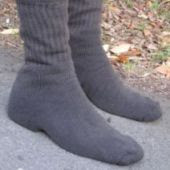
Woolly socks on a warm day

Hello!

I am at the CIJE (Center for Initiatives in Jewish Education) engineering training session in New York "hobb-knobbing" with some amazing educators.  During one of the breaks, I overheard a cool, little, easy to use, science lab.  (Shout out to Heshy and Yaffa)
MS Teachers taking CIJE training
www.thecije.org

So here is the scenario:

As a child (or maybe an adult??) did your mother ever yell at you: "Don't walk outside in your stocking feet!!"

And what was your response?... "Aw-gee Ma, I am only going out for a second. What's the harm? I won't step on anything!!"  Well, this little lab can show what really happens...

Simply, have your students walk outside (usually in the spring or fall for best results) in a pair of woolen socks.  Let them walk through the grass, close to trees, flowers and so on.  Bring them (and their socks) back into the classroom.  Sprinkle a bit of water on the socks and (optional shake a bit of potting soil on the socks) put them in a zip-lock bag.  Let them sit (in a warm environment) and germinate for about a week.... look at the results.

http://sciencelearn.org.nz/Science-Stories/Seeds-Stems-and-Spores/Woolly-sock-walk

Here is a link that I found on the web from New Zealand...

So, what do you think of this lab?  What questions does it raise?  How would you use it in your classroom.  As always, your comments are solicited on the blog site.

Yossie


Yossie Frankel
I.T. Director - Shalhevet High SchoolTechnology Specialist - CIJE

Checkout my blog @ technorebbe.blogspot.com
Twitter @yossiefrankel
YouTube Channel: YossieFrankelChannel
LinkedIn: www.linkedin.com/in/yossiefrankel

Wednesday, June 3, 2015

Reach out and TOUCH SOMEONE?

Virtual and Augmented Reality are cool.  Unfortunately, cool only goes so far - there must be a REASON why we would use it in Education.  Well, in my last post, I gave an excellent example of how VR can transport whole classrooms of students to places that they have never been and would, most likely, never go.  The visuals and audio are amazing and transformative, but I felt like there was something missing... UNTIL NOW!

Enter, GLOVEone!

Yes, it is finally here.  The interactive tool that lets you FEEL the environment that you are virtually visiting.  Here is their promo video - get ready to be inspired.

https://vimeo.com/129412957

Here is the "techie" video on how the device works.

https://vimeo.com/129434792

OK... so what do you think?  At the rate at which this stuff is coming out, I am going to need to create a "Kick-starter" just to be able to afford to test them!!  Speaking of Kickstarter, here is the link to the GloveOne campaign.

So my friends out there in" virtual blog-land"...are YOU ready to reach out and touch someone?

As always, please post your comments on the blog page.

Yossie


Yossie Frankel
Director - Consortium for Information and Academic Technologies
Member Schools:
Harkham Hillel Hebrew Academy - yfrankel@hillelhebrew.org
Oakland Hebrew Day School - y.frankel@ohds.org
Shalhevet High School - y.frankel@shalhevet.org
Yeshivat Yavneh - www.yha.org
Arete Preparatory Academy - yfrankel@areteprep.org
Midreshet Emunah V'Omanut - Jerusalem - yfrankel@emunahvomanut.org
Checkout my blog @ technorebbe.blogspot.com
Twitter @yossiefrankel
YouTube Channel: YossieFrankelChannel
LinkedIn: www.linkedin.com/in/yossiefrankel

Sunday, May 31, 2015

Field Trips - no bus? no budget? NO PROBLEM!!

Google I/O, the yearly extravaganza that shows us what the Mega-Tech Giant has been up to, ran last week in Northern California.  While a lot was shown and released, this item really caught my fancy...

Virtual Field Trips.

Yes, your read correctly - Virtual Filed Trips.  

It can be very difficult to get a bus load of 4th graders over to China to walk on the Great Wall.  The bathroom breaks alone would drive a teacher crazy!!  The solution?  Grab a lab of Google Cardboard viewers with smart phones, a teacher tablet and press go!!

Yep, That easy!!  AND IT IS RUNNING RIGHT NOW!!!

(The part of the video that has the most meaning for me is when the kids all go "whoa!!")


The really cool part is how they make the videos.  Google has partnered with GoPro cameras to make the "Google Jump" camera aray.  Shoot a video with this device, upload it to YouTube and Google will do the rest of the magic for you to make your very own, 3D, HD, VR Video!!


So, You don't have the $8K to buy a Jump Camera array... what now??

Well, you can purchase your very own Kodak SP360 Camera and make some really cool video.  I have one and we recorded a 360 video that we played at the Shalhevet annual gala. It was absolutely AMAZING when viewed on the Google Cardboard.  For a less personal version, click below and give it a try on your computer, smart phone or tablet.  When playing on an iPad/iPhone, you MUST use the YouTube app.  Also, hold the iPad/iPhone at eye level and move it around.  The Gyroscope moves the point of view... very cool!  When on a PC or Mac, you MUST use the Google Chrome viewer.


OK... I hear you... My video is not HD and 3D, but you have to admit it IS pretty cool.  And all for under $300.00! 

Do you want higher resolution and more field of view?  Well... there ARE new 360 degree cameras coming out on the market that will now give you a full 360degree video that ALSO has a full 300 degrees (or more) of vertical view... you just won't be able to see your feet!

Giroptic 360 Cam - click to see video

Bubl Cam - click to see video


And how to view these videos on you iPad or 'Droid phone using Google Cardboard... there is a fantastic viewer called Kolor!  Just don't take my word for it - try it it yourself.  That's right... download the app right now, put it in "cardboard split screen mode" and watch a video.


By the way... try not to fall over!!

As always, your comments are solicited on the blog page.

Regards!

Yossie


Yossie Frankel
Director - Consortium for Information and Academic Technologies
Member Schools:
Harkham Hillel Hebrew Academy - yfrankel@hillelhebrew.org
Oakland Hebrew Day School - y.frankel@ohds.org
Shalhevet High School - y.frankel@shalhevet.org
Yeshivat Yavneh - www.yha.org
Arete Preparatory Academy - yfrankel@areteprep.org
Midreshet Emunah V'Omanut - Jerusalem - yfrankel@emunahvomanut.org
Checkout my blog @ technorebbe.blogspot.com
Twitter @yossiefrankel
YouTube Channel: YossieFrankelChannel
LinkedIn: www.linkedin.com/in/yossiefrankel
Thursday, May 28, 2015

URGENT..... iPhone texting bug

URGENT INFO TO CONSORTIUM SCHOOLS....

Sorry about the delay on this... I only found out about an hour ago...

There is a text that will bring your iOS device crashing down - really, it truly exists!!!

Rather than go into detail... here is a link to a reputable site explaining it.

While it is annoying, this bug CAN stop your iPhone from texting properly until you fully delete the "key text" that started this....  Here is a series of recommendations to fix the problem..  (The "text me" from Siri seems to work the best...)

Please be aware of this and the possible fixes.  Apple will release an update at some point, but no one knows when yet...

If you need more info, please contact me directly.

Regards...

Yossie


Yossie Frankel
Director - Consortium for Information and Academic Technologies
Member Schools:
Harkham Hillel Hebrew Academy - yfrankel@hillelhebrew.org
Oakland Hebrew Day School - y.frankel@ohds.org
Shalhevet High School - y.frankel@shalhevet.org
Yeshivat Yavneh - www.yha.org
Arete Preparatory Academy - yfrankel@areteprep.org
Midreshet Emunah V'Omanut - Jerusalem - yfrankel@emunahvomanut.org
Checkout my blog @ technorebbe.blogspot.com
Twitter @yossiefrankel
YouTube Channel: YossieFrankelChannel
LinkedIn: www.linkedin.com/in/yossiefrankel

Thursday, May 21, 2015

I have fat fingers

I have a major complaint - I have fat fingers...

Don't misunderstand me, I LOVE using the touch screen on my 'droid smart phone.  It does so much for me while I am on-the-go, but I HATE taking notes with it as I just cant get used to the small on-screen keyboard.  Using my fingers to "write" with is no option either.

You know what else I hate?  Having to take my smartphone off my belt clip in order to jot down a quick note.

Well, it appears, that there is a solution to my "kvetching" (complaining).

Welcome the Phree - fresh out of "The Startup Nation!!" It is the coolest input device that answers all of my dreams.

https://youtu.be/tuY_TYqiasU  
You just MUST watch their video.... and then go to the kickstarter page.


Now if I can only convince my wife to allow me to spend the money. (Hey, OTM Tech... can I get free demo unit and keep it?... Just asking!)

Kol Ha Kavod Gilad, Opher, Uri and Elisha.

As always, please leave you comments on my blog site.

Yossie


Yossie Frankel
Director - Consortium for Information and Academic Technologies
Member Schools:
Harkham Hillel Hebrew Academy - yfrankel@hillelhebrew.org
Oakland Hebrew Day School - y.frankel@ohds.org
Shalhevet High School - y.frankel@shalhevet.org
Yeshivat Yavneh - www.yha.org
Arete Preparatory Academy - yfrankel@areteprep.org
Midreshet Emunah V'Omanut - Jerusalem - yfrankel@emunahvomanut.org
Checkout my blog @ technorebbe.blogspot.com
Twitter @yossiefrankel
YouTube Channel: YossieFrankelChannel
LinkedIn: www.linkedin.com/in/yossiefrankel